- Page d'accueil /
- Électronique /
- Computer Accessories /
- Computer Accessories & Peripherals /
- Audio & Video Accessories /
- Webcams & VoIP Equipment /
- Webcams /
- Web Camera, HD Webcam for Computer for Monito...
0 ratings

Numéro d'article:
127901580
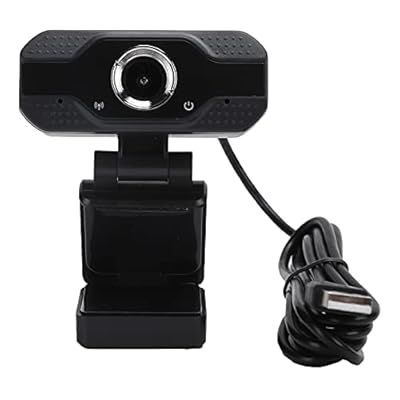
Web Camera, HD Webcam for Computer for Monitor
Numéro d'article:
127901580
€ 20
Price Details
Excluding Shipping & Custom charges ( Shipping and custom charges will be calculated on checkout )
*All items will import from États-Unis
0 ratings
Écrire un commentaire
En stock
 Importé depuis la boutique USA
QTY:
Commandez maintenant et recevez votre commande aux alentours du Mardi, Août 11
Transaction sécurisée
Ubuy s'engage à protéger votre sécurité et votre confidentialité. Notre système avancé de sécurité des paiements garantit la confidentialité en chiffrant vos informations lors de la transmission grâce aux protocoles AES (Advanced Encryption Standards) et SSL (Secure Socket Layer). Vos coordonnées de paiement sont 100 % sécurisées car nous ne partageons pas vos informations de paiement avec des vendeurs tiers.
Nos meilleurs partenaires logistiques


The 1080P high-definition camera brings true color images, and provides clear and stable pictures.

Livraison
rapide

Retour
gratuit*

Emballage sécurisé

Produits 100 % originaux

Conformité PCI DSS

Certifié ISO 27001


Note: Step 1 Voltage Transformer required for using electronics products of États-Unis store (110-120). Recommended power converters Acheter maintenant.


Ce qui se démarque
High Definition
Experience crystal-clear video quality with 1080p HD resolution, ensuring professional-looking streams and conferences that capture every detail.
Easy Setup
Plug-and-play compatibility with various operating systems allows for hassle-free installation, making it perfect for any user seeking quick access to high-quality video.
Built-in Microphone
Enjoy clear audio with an integrated noise-cancellation microphone designed to filter out background noise, enhancing communication during video calls and recordings.
Détails du produit
| Item Weight | 0.5 lbs (230 grams) |
À qui est-ce destiné ?

-
Remote Workers
This webcam enhances video quality for remote workers, ensuring clear communication during online meetings and presentations.
-
Content Creators
Ideal for vloggers and streamers, offering high-definition video quality to attract viewers and improve engagement.
-
Online Students
Perfect for students attending virtual classes, providing clear visuals for effective interaction with teachers and peers.

-
Professional Studios
Professionals seeking high-end video quality may find this webcam lacks the advanced features needed for studio production.
-
Low Bandwidth Users
Users with slow internet connections might struggle with HD video streaming, leading to lag and reduced performance.
-
Gaming Enthusiasts
Gamers needing advanced features like high frame rates and autofocus may find the webcam insufficient for their needs.
DESCRIPTION DU PRODUIT
Web Camera, HD Webcam for Computer for Monitor
Vous avez une question ? Chattez avec nous
Questions et réponses des clients
-
question:
What features should I look for in a high-definition webcam?
répondre: When selecting a high-definition webcam, prioritize features such as resolution (look for at least 1080p), frame rate (ideally 30 fps or higher), and low-light performance for clearer images. Additionally, consider features like built-in microphones for improved audio quality, autofocus, and a wide field of view if you'll be using it for group calls. These specifications help ensure that your video calls are sharp and professional-looking, making them ideal for business meetings, online classes, and live streaming. -
question:
Can I use an HD webcam for streaming purposes?
répondre: Absolutely! An HD webcam is an excellent choice for streaming due to its high-quality video output. Many streamers use webcams for broadcasting live gameplay, beauty tutorials, or cooking shows. An HD webcam ensures your audience experiences crisp visuals, enhancing engagement. Make sure to check compatibility with your streaming software and adjust settings for optimal performance. -
question:
How do I set up my webcam with my computer?
répondre: Setting up a webcam is generally straightforward. Most HD webcams connect via USB; simply plug it into your computer, and it should be recognized automatically. If you’re using specific software for video calls or streams, make sure to select your webcam as the default device in the app settings. This setup is perfect for teleconferences or virtual gatherings, ensuring seamless connectivity and communication. -
question:
What are the benefits of having an integrated microphone on a webcam?
répondre: An integrated microphone on a webcam allows for clear audio without needing additional equipment. This feature is particularly useful during video calls, as it captures sound from a closer range, enhancing clarity. Integrated mics can reduce background noise, making them ideal for professional interviews or casual chats. It simplifies the setup, providing a more streamlined experience for online meetings or content creation. -
question:
Is it possible to use multiple webcams on one computer?
répondre: Yes, you can use multiple webcams on one computer, provided your system resources can handle it. Each webcam will need to be selected within your software settings to toggle between them easily. This can be particularly useful for content creators who wish to show different angles during a live stream, enhancing viewer engagement with varied perspectives. -
question:
What is the significance of a wide field of view in webcams?
répondre: A wide field of view in a webcam allows you to capture a broader scene, which is essential for group video calls or showing more of your workspace. This feature is ideal for collaborations and discussions where multiple participants are present. It ensures everyone is included in the frame, enhancing interaction during virtual meetings or classes. -
question:
Can I adjust the position of my webcam for better angle?
répondre: Most HD webcams come with adjustable mounting options that allow you to position the camera for the best angle. Many models feature flexible stands or clip-on designs to fit seamlessly on monitors. Positioning your webcam at eye level and slightly angled down can create a more engaging and professional appearance during video calls, improving how you connect with your audience. -
question:
Are there specific lighting conditions for optimal webcam use?
répondre: Yes, good lighting is crucial for webcam performance. Natural light is ideal, but if that’s not available, consider using soft, diffused light sources to illuminate your face evenly without harsh shadows. Proper lighting enhances image quality, making you look more professional and approachable during video calls, whether you're in a home office or a casual setting. -
question:
How do I ensure my webcam is secure and protected?
répondre: To keep your webcam secure, ensure you regularly update your device drivers and software to protect against vulnerabilities. Additionally, consider using a physical cover when not in use to prevent unauthorized access. Using these security measures will make your video calls safer and reassure you that your private moments remain private. -
question:
Where can I buy Web Camera, HD Webcam for Computer for Monitor in Mayotte?
répondre: You can purchase the Web Camera, HD Webcam for Computer for Monitor at Ubuy. They offer a wide range of options tailored to your needs and preferences. Ubuy ensures a user-friendly shopping experience and provides detailed descriptions and specifications for various webcam models, making it easier for you to choose the right product.
WNSC Webcams Editorial Review
Aucune critique éditoriale trouvée
Avis et évaluations clients
1 évaluations des clients
-
5 étoile
100%
-
4 étoile
0%
-
3 étoile
0%
-
2 étoile
0%
-
1 étoile
0%
Donnez votre avis sur ce produit
Partagez votre avis avec d'autres clients
Platform Trust & Buyer Confidence

MT
Mohd
Verified buyer
“The product received very good packaging & safe…Thank You”
16 June 2026 · via Trustpilot
SJ
Shawati
Verified buyer
“Accurate delivery timing given”
16 June 2026 · via Trustpilot
YB
Youcef
Verified buyer
“Not madly expensive like I thought, and much quicker than promised.”
15 June 2026 · via Trustpilot
LM
Leila
Verified buyer
“Never dealt with Ubuy before, but everything worked out great. Seamless cross border purchasing and shipping. Thanks!”
6/7/2026 · via Trustpilot
KA
Kwame
Verified buyer
“The process was smooth, with clear communication and timelines. This was my 1st purchase and I am really impressed. I will definitely be coming back.”
12 June 2026 · via Trustpilot
Paiement sécurisé
Global Delivery
Easy Returns
Genuine Products
Historique des prix du produit
Informations importantes
- Limitations : Pour les produits expédiés à l'international, veuillez noter que toute garantie du fabricant peut ne pas être valide ; les options de service du fabricant peuvent ne pas être disponibles ; les manuels, instructions et avertissements de sécurité des produits peuvent ne pas être dans les langues du pays de destination ; les produits (et les matériaux qui les accompagnent) peuvent ne pas être conçus conformément aux normes, spécifications et exigences d'étiquetage du pays de destination ; et les produits peuvent ne pas être conformes à la tension et aux autres normes électriques du pays de destination (nécessitant l'utilisation d'un adaptateur ou d'un convertisseur le cas échéant). Il incombe au destinataire de s'assurer que le produit peut être importé légalement dans le pays de destination. En cas de commande auprès d'Ubuy ou de ses filiales, le destinataire est l'importateur officiel et doit se conformer à toutes les lois et réglementations du pays de destination.
- Tous les produits listés sur Ubuy ne sont pas à vendre, Ubuy étant un moteur de recherche mondial. Les produits sont soumis aux réglementations en matière d'exportation et de commerce.
€ 20
Commandez maintenant et recevez votre commande aux alentours du Mardi, Août 11
This item is not restrict in my country.(Please click on above link if this item is not restrict in your country, So our team will review and allow.)
QTY:
Transaction sécurisée
PCI DSS compliant and ISO 27001:2022 certified, with encrypted payments and full buyer protection on every order.
Nos meilleurs partenaires logistiques
Livraison transfrontalière la plus rapide
Caractéristiques et avantages
- Experience stunning 1080P high-definition clarity.
- Features an internal noise-cancelling microphone for crystal clear audio.
- Built with high-quality, durable materials for long-lasting use.
- Manual focus design ensures perfect picture quality without distortion.
- Versatile multifunctional base allows for various mounting options.
- Compatible with multiple operating systems for easy setup.
Ubuy Assurance
Experience worry-free shopping with 100% original products, PCI DSS-compliant payment security, ISO 27001-certified data protection, the fastest cross-border delivery, free returns *, and secure packaging on every order.