0 ratings

Item #:
233306701
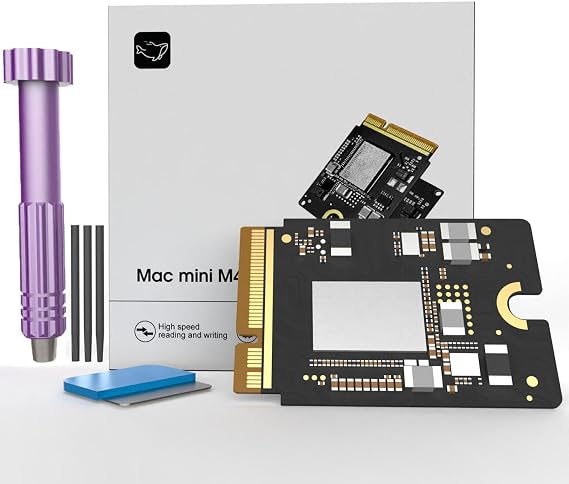
Mac mini M4 SSD 1TB, Hard Disk Storage Upgrade for Mac mini M4
Item #:
233306701
€ 299
Price Details
Excluding Shipping & Custom charges ( Shipping and custom charges will be calculated on checkout )
*All items will import from US
0 ratings
Write a review
In stock
 Imported from USA store
QTY:
Order now and get it around Monday, August 24
Secured transaction
Ubuy works hard to protect your security and privacy. Our advanced payment security system ensures confidentiality by encrypting your information during transmission using AES (Advanced Encryption Standards) and SSL (Secure Socket Layer) protocols. Your payment details are 100% secure as we do not share your payment details with third party sellers.
Our Top Logistics Partners


Expand your Mac mini M4 storage with our 1TB SSD, boasting read/write speeds of up to 3300 MB/s for lightning-fast performance!

Fast
Shipping

Free
Return*

Secure Packaging

100% Original Products

PCI DSS Compliance

ISO 27001 Certified



Note: Step 1 Voltage Transformer required for using electronics products of US store (110-120). Recommended power converters Buy Now.


What Stands Out
High-Performance SSD
Experience lightning-fast data access speeds with the Mac Mini M4’s 1TB SSD, enhancing productivity and multimedia applications for seamless performance.
Efficient Storage Solution
Upgrade your Mac Mini M4 with 1TB of reliable storage capacity, addressing user needs for larger files, applications, and smooth multitasking without the hassle of frequent upgrades.
Compatible Upgrade
Designed specifically for Mac Mini M4, this SSD ensures compatibility and reliability, providing users an easy installation without compromising performance or system integrity.
Product Details
| Digital Storage Capacity | 1 TB |
| Hard Disk Interface | eSATA |
| Connectivity Technology | Thunderbolt |
| Additional Features | Data Recovery Service |
| Hard Disk Form Factor | 2.5 Inches (6.4 cm) |
| Compatible Devices | Macmini M4 |
| Specific Uses For Product | Personal |
| Read Speed | 3300 Megabytes Per Second |
| Media Speed | 3300 Megabytes Per Second |
| Data Transfer Rate | 3300 Megabits Per Second |
| Form Factor | 2.5-inch (6.4 cm) |
| Hardware Connectivity | Thunderbolt |
| Installation Type | Internal Hard Drive |
| Enclosure Material | Nand Flash |
| Brand | Zinweyton |
| Model Number | AD-AU |
| Hard Disk Description | Solid State Drive |
| Built-In Media | 1 |
| Model Name | AD-AU |
| Manufacturer | Zinweyton |
| Hard-Drive Size | 1 TB |
| Number of Items | 1 |
| Unit Count | 1.0 Count |
| Customer Package Type | Standard Packaging |
| Special Feature | Data Recovery Service |
| Hard Disk Size | 1 TB |
| Item Weight | 0.5 lbs (230 grams) |
Who Should Buy?

-
Creative Professionals
Ideal for graphic designers and video editors needing expansive storage for large project files and high-resolution media.
-
Gamers
Offers ample space for extensive game libraries and installations, enhancing performance with faster load times.
-
Tech Enthusiasts
Perfect for users looking to upgrade their Mac Mini for optimal performance, ensuring a future-proof system.

-
Casual Users
Not suitable for users who perform basic tasks and require minimal storage, often underutilizing the upgrade's capacity.
Product Description
Mac mini M4 SSD 1TB, Hard Disk Storage Upgrade for Mac mini M4
Have any Query? Chat with us
Customer Questions & Answers
-
Question:
What are the benefits of upgrading to a 1TB SSD for my Mac mini?
Answer: Upgrading to a 1TB SSD significantly enhances your Mac mini's performance. The increased storage capacity allows you to store more applications, files, and media without worrying about running out of space. Additionally, SSDs provide faster read and write speeds compared to traditional hard drives, resulting in quicker boot times, application launches, and file transfers. This upgrade is particularly beneficial for users working with large files or demanding applications, such as video editing software or graphic design programs. -
Question:
Is the M4 Macmini 1TB SSD compatible with my Mac mini model?
Answer: The M4 Macmini 1TB SSD is designed for specific Mac mini models. Before making a purchase, it’s crucial to verify compatibility with your Mac mini version. You can typically find compatibility information in the product specifications or by checking Apple’s official documentation. Ensuring that the SSD matches your system's model will guarantee optimal performance and reliability post-installation, allowing you to take full advantage of the storage upgrade. -
Question:
Can I install the 1TB SSD myself, or will I need professional help?
Answer: Yes, the M4 Macmini 1TB SSD is designed for DIY installation, making it accessible for users with basic technical skills. The process typically involves opening the Mac mini case, replacing the current hard drive with the SSD, and securely reassembling the unit. Installation guides and video tutorials are often available online to assist you through each step. However, if you're uncomfortable performing the upgrade yourself, seeking help from a professional technician is always an option. -
Question:
What tools do I need to install the M4 Macmini 1TB SSD?
Answer: To install the M4 Macmini 1TB SSD, you'll need a few basic tools. Typically, a Torx screwdriver set and a spudger tool are essential for opening the Mac mini and safely removing the existing hard drive. Additionally, you may require an ESD strap to prevent static damage to internal components. Preparing these tools before starting the installation process will help ensure a smooth and safe upgrade experience, allowing you to focus on the task at hand. -
Question:
Will upgrading to a 1TB SSD improve gaming performance on my Mac mini?
Answer: Absolutely, upgrading to a 1TB SSD can enhance gaming performance on your Mac mini. SSDs provide faster data access, which translates to quicker load times for games and smoother gameplay. This enhancement is particularly evident in titles requiring substantial assets or textures. Players should notice an overall improvement in the gaming experience, enabling more fluid transitions and less lag during gameplay. -
Question:
What precautions should I take before installing the M4 Macmini SSD?
Answer: Before installing the M4 Macmini SSD, it’s essential to back up all important data to avoid data loss. Additionally, you should ensure your workspace is well-lit and free from static electricity to protect your Mac mini’s internal components. Take your time to understand the installation process through manuals or guides, and prepare all necessary tools beforehand. Following these precautions will promote a successful upgrade and help maintain the integrity of your device. -
Question:
Can I use the M4 Macmini 1TB SSD for booting macOS?
Answer: Yes, the M4 Macmini 1TB SSD is suitable for booting macOS. In fact, installing macOS on an SSD can lead to notable improvements in system responsiveness and performance. After installation, you can easily configure the new SSD as your startup disk through system preferences. This setup allows for faster boot times, allowing you to start working more quickly and efficiently. -
Question:
What is the expected lifespan of an SSD compared to a traditional hard drive?
Answer: SSDs, including the M4 Macmini 1TB SSD, generally offer a longer lifespan than traditional hard drives. With no moving parts, SSDs are less prone to mechanical failure, making them more durable. While the actual lifespan varies based on usage, typically, SSDs can last many years while providing consistent speed and performance. This longevity makes them an excellent investment for users seeking reliable storage solutions. -
Question:
What format should I use to initialize my new SSD after installation?
Answer: After installing the M4 Macmini 1TB SSD, it is recommended to initialize it in the APFS format. This file system is optimized for SSDs and provides improved efficiency for macOS. To format the drive, you can use the Disk Utility application available in macOS. Choosing the right format ensures your SSD operates smoothly and takes full advantage of its performance capabilities, helping you achieve optimal results. -
Question:
Where can I buy the 2025 M4 Macmini 1TB SSD Storage Upgrade Internal Hard Disk for Mac mini in Mayotte?
Answer: You can purchase the 2025 M4 Macmini 1TB SSD Storage Upgrade Internal Hard Disk for Mac mini at Ubuy. They offer a wide range of products, including this SSD upgrade, ensuring convenience in your shopping experience. Ubuy is known for its reliable service and can help you find the right components for your Mac mini.
Zinweyton Internal Components AD-AU Editorial Review
No editorial reviews found
Customer Reviews & Ratings
1 customers ratings
-
5 Star
100%
-
4 Star
0%
-
3 Star
0%
-
2 Star
0%
-
1 Star
0%
Review this product
Share your thoughts with other customers
Pros
- Excellent build quality
- User-friendly design
- High performance
- Great customer support
- Stylish appearance
Cons
- A bit heavier than expected
Platform Trust & Buyer Confidence

MA
Mohammad
Verified buyer
“Excellent quality and original too,when ubuy send original things I will appreciate that ,I very satisfied thank you”
23 July 2026 · via Trustpilot
CK
Chitra
Verified buyer
“The order and delivery progress was communicated very well. Package arrived within the estimated time. Products arrived as expected in good condition.”
22-Jul-26 · via Trustpilot
K
kund
Verified buyer
“Good supply of products. Safe payment methods, and shipment worldwide! Genuine products.”
23-Jul-26 · via Trustpilot
OO
Onesi
Verified buyer
“Was my first time buying a product from Ubuy, but I found it so helpful. This is reliable. Gonna place a new order!”
22 July 2026 · via Trustpilot
SJ
SAO JOHN
Verified buyer
“Ubuy is a great online platform to buy stuff. Reliable, fast delivery time and great value for money. I've been using Ubuy online shopping platform for three years now and will continue to do so.”
23 July 2026 · via Trustpilot
Secure Checkout
Global Delivery
Easy Returns
Genuine Products
Product Price History
Important information
- Limitations : For products shipped internationally, please note that any manufacturer warranty may not be valid; manufacturer service options may not be available; product manuals, instructions, and safety warnings may not be in destination country languages; the products (and accompanying materials) may not be designed in accordance with destination country standards, specifications, and labeling requirements; and the products may not conform to destination country voltage and other electrical standards (requiring use of an adapter or converter if appropriate). The recipient is responsible for assuring that the product can be lawfully imported to the destination country. When ordering from Ubuy or its affiliates, the recipient is the importer of record and must comply with all laws and regulations of the destination country.
- Not all the products listed on Ubuy are for sale, as Ubuy is a global search engine. Products are subject to export/trade regulations.
€ 299
Order now and get it around Monday, August 24
This item is not restrict in my country.(Please click on above link if this item is not restrict in your country, So our team will review and allow.)
QTY:
Secured transaction
PCI DSS compliant and ISO 27001:2022 certified, with encrypted payments and full buyer protection on every order.
Our Top Logistics Partners
Fastest cross-border delivery
Features & Benefits
- Perfect compatibility with Mac mini M4 for easy installation.
- Fully tested for reliability and consistent performance without speed drops.
- Offers 1TB capacity to store more photos, videos, documents, and apps.
- High-speed performance with read/write speeds of up to 3300 MB/s.
- Improves computer startup time and application launch speeds.
- Enhance your digital experience with efficient file transfer capabilities.
Ubuy Assurance
Experience worry-free shopping with 100% original products, PCI DSS-compliant payment security, ISO 27001-certified data protection, the fastest cross-border delivery, free returns *, and secure packaging on every order.